Noise ColorFit Icon 4 Smart Watch - ABHI Marketplace


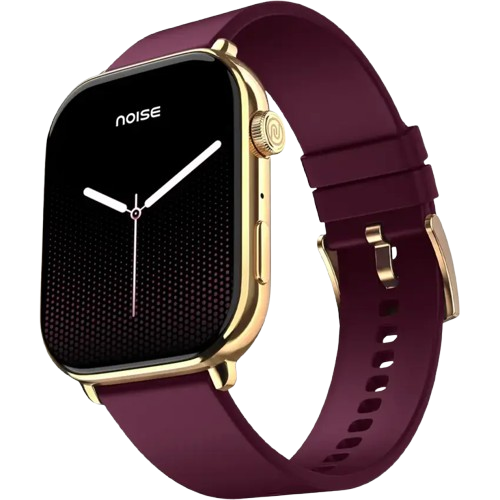
Buy Noise ColorFit Icon 4 smart watch that comes with 1.96" AMOLED display, AI voice assistance, has IP68 water-resistant rating, 100+ watch faces and a battery life up to 7 days.
Specifications
| Country of Origin | China |
|---|---|
| Package Contents | 1 device, 1 charging cable, 1 user manual, warranty card |
| Marketed & Imported By | Nexxbase Marketing Pvt. Ltd, Khasra No-146/25/2/1, Jail Road Badshahpur, Gurugram Haryana-122101 |
Connectivity
| System Requirement | ios 17.0 + or Android 9.0 + |
|---|---|
| BT | v5.3 |
Display
| Display technology | AMOLED |
|---|---|
| Size | 1.96” |
| Resolution | 240*282 |
| Cloud-based watch faces | Yes |
Sensors
| Heart rate sensor | Yes |
|---|---|
| Accelerometer | No |
| SpO2 sensor | Yes |
Battery & Charging
| Typical Usage Time | Up to 7 days |
|---|---|
| Standby Time | Up to 30 days |
| Charging Time | Up to 2 hours |
| Charging Cable | Yes |
Physical Specification
| Watch Case Material | Metal |
|---|---|
| Strap Size & Material | 22mm (silicone & metallic chain) |
| Water Resistance Rating | IP68 |
Health Monitoring Features
| Heart Rate | |
| SpO2 | |
| Sleep monitor | |
| Stress measurement | |
| Female cycle tracker |
Smart Features
| Caller name information | |
| Call rejection | |
| AI Voice Assistant | |
| Stopwatch | |
| Timer | |
| Alarm | |
| Reminder | |
| Music Controls | |
| Weather | |
| Vibration alert | |
| Do not disturb mode | |
| Screen brightness | |
| Functional crown | |
| Wrist-awake |
FAQs
What kind of display does ColorFit Icon 4 have?
ColorFit Icon 4 is built around a large 1.96-inch AMOLED display, giving you plenty of room to read notifications, stats and watch faces at a glance with the deep contrast and vivid colour AMOLED is known for. It supports cloud-based watch faces, with 100+ designs available, so you can download and switch looks to match your style through the NoiseFit app.
Is ColorFit Icon 4 water resistant?
ColorFit Icon 4 carries an IP68 water-resistance rating, giving it solid protection against sweat, rain and accidental splashes, so you can wear it through workouts and everyday conditions without worry. That said, IP68 here is not a swimming or diving rating, so it is best to avoid submerging the watch or wearing it in the shower, pool or sea.
Does ColorFit Icon 4 have a voice assistant and a functional crown?
Yes, ColorFit Icon 4 features an AI Voice Assistant you can trigger from the watch, plus a functional crown you can rotate and press to navigate menus quickly. A wrist-awake gesture lights the screen when you raise your arm, and everyday tools such as music controls, weather, a stopwatch, timer, alarm and reminders round out its smart features.
What is the ColorFit Icon 4 build and strap made of?
ColorFit Icon 4 uses a metal watch case that gives it a premium, sturdy feel to match its large square face. The 22mm strap comes in two material choices, a comfortable everyday silicone band and a dressier metallic chain, so you can dress the watch up or down. This makes it versatile enough for both workouts and more formal settings.
Does ColorFit Icon 4 show app notifications, and what if they stop arriving?
Yes, ColorFit Icon 4 displays push notifications from social and messaging apps you have enabled through the NoiseFit app, so alerts appear on your wrist. If they stop arriving, it is usually a Bluetooth issue: keep the watch and phone within range, make sure alerts are switched on in the app with the app locked in the background on Android, and confirm Do Not Disturb is off on the watch.
Can I see caller information and read messages on ColorFit Icon 4?
Yes. As long as your ColorFit Icon 4 is synced with the NoiseFit app and within Bluetooth range, incoming caller names and messages appear on the watch as notifications. To see caller details, turn on the call-notification feature in the app. When a new message arrives you can read it on the watch straight away, and you can also scroll back through previously received notifications later.
Which app does ColorFit Icon 4 use and how do I manage my profile?
ColorFit Icon 4 pairs with the free NoiseFit app, which is where you set up the watch, view your health data and adjust preferences. To manage your profile, open the app, go to My Device and choose Device settings. Keeping your personal details accurate there helps the watch calculate metrics such as calories more precisely.
How do I track my workouts in the NoiseFit app?
Your workout and activity data from ColorFit Icon 4 syncs into the NoiseFit app so you can review it in detail. Open the app and, on the Home page, go to the Daily Report section, where your daily activity summary is compiled. This lets you follow trends over time across steps, distance, heart rate and calories, rather than only seeing a snapshot on the watch.
Can I change the units of measurement on ColorFit Icon 4?
The units of measurement in the NoiseFit app are fixed once first set, so they cannot be switched afterwards between metric and imperial. Because of this, it is worth choosing your preferred units carefully during the initial setup, as distance and other metrics will then be displayed in that system consistently across both the app and the watch.
How long does the ColorFit Icon 4 battery last?
ColorFit Icon 4 offers up to 7 days of battery life on a single charge with typical use. In standby, where the watch is used only as a regular timepiece, that charge can extend to as long as 30 days. Real-world battery life falls between the two and depends on how often you use the large AMOLED display and all-day heart-rate tracking.
How do I charge ColorFit Icon 4 and which adapter should I use?
Connect the magnetic charging cable to your ColorFit Icon 4; a full charge takes roughly 2 hours, and the watch shows a 100% Charged message once the battery is full. Use a low-power adapter, or plug the cable into a laptop or PC USB port. Avoid fast-charging adapters, as they can damage the watch over the long run.
How do I check the battery level on my ColorFit Icon 4?
Checking the remaining charge on your ColorFit Icon 4 is quick. Wake the watch screen by raising your wrist or tapping it, then swipe up from the watch face to open the quick panel, where the current battery percentage is shown. Keeping an eye on this lets you top the watch up before a long day so it never runs flat unexpectedly.
How can I make my ColorFit Icon 4 battery last longer?
A couple of settings changes noticeably extend how long your ColorFit Icon 4 lasts between charges. Lower the screen brightness, since the large 1.96-inch AMOLED display is one of the biggest power draws, and turn off All-Day Heart Rate measurement so the sensor runs only when needed rather than continuously. Together these reduce background activity and add meaningful hours to each charge.
Which phones is ColorFit Icon 4 compatible with?
ColorFit Icon 4 works with both iPhone and Android. On Apple devices it supports any iPhone running ios 17.0 or later, and on Android it supports phones running Android version 9.0 or later. As long as your phone meets those versions, it pairs with the watch through the free NoiseFit app to sync data and receive notifications.
How do I set up my ColorFit Icon 4 for the first time?
Make sure both your ColorFit Icon 4 and your smartphone are charged and next to each other, then connect the charging cable to power the watch on. Download the NoiseFit app, open it, and allow Bluetooth and GPS positioning when prompted. Enter your personal details and health goals, then open the add-device page, select the device type, and link your Icon 4 to finish pairing.
Why won't my ColorFit Icon 4 sync or finish setup?
Most sync and setup problems come down to a dropped Bluetooth link between the watch and your phone. Keep the NoiseFit app running and locked in the background so the connection stays stable, and keep both devices close together with Bluetooth switched on. If setup still will not complete, reset your ColorFit Icon 4 and try pairing it again from the start.
Why didn't my ColorFit Icon 4 alert me to a notification?
Missed alerts on your ColorFit Icon 4 are usually caused by a loss of Bluetooth connectivity with your phone. Check that the two stay within Bluetooth range, that alerts are switched on inside the NoiseFit app, and that the app is running and locked in the background on Android. Also make sure Do Not Disturb mode is turned off on the watch, as that silences alerts too.
How do I restart or power off my ColorFit Icon 4?
Both actions sit in the same place on the watch. Wake the screen and swipe up to open Settings. To restart, select Reboot and confirm; to switch the watch off completely, select Power Off and confirm instead. A restart is the quicker fix for minor glitches, while a full power-off is useful when storing the watch or troubleshooting a stubborn issue.
How do I reset my ColorFit Icon 4 to factory settings?
You can reset your ColorFit Icon 4 directly from the watch. From the home screen, swipe up to open Settings, then select Reset and confirm your choice. A reset restores the watch to its original state, which is a useful step when setup keeps failing or the watch behaves unexpectedly; afterwards you will need to pair it with the NoiseFit app again.
Does ColorFit Icon 4 support female health tracking?
Yes, ColorFit Icon 4 includes a female cycle tracker as part of its health features. Through the NoiseFit app you can log and monitor your menstrual cycle, helping you keep track of periods and related phases alongside the watch's other wellness metrics such as heart rate, SpO2, sleep and stress, making it a rounded daily health companion.
Does ColorFit Icon 4 track stress?
Yes, ColorFit Icon 4 comes with stress measurement. It gauges your stress level so you can notice when you may be tense and take a moment to relax, and your readings sit alongside heart rate, SpO2 and sleep data in the NoiseFit app. Tracking this over time gives you a fuller picture of your overall wellbeing beyond just activity.
What does the SpO2 monitor on ColorFit Icon 4 do?
The SpO2 monitor on ColorFit Icon 4 measures the oxygen saturation level in your blood, shown as a percentage. Blood-oxygen readings give you a quick sense of how well your body is oxygenated, which some people like to check after exertion or at altitude. You can take a reading from the wrist and review the results in the NoiseFit app.
How does ColorFit Icon 4 calculate the calories I have burned?
ColorFit Icon 4 estimates your calorie burn by combining several inputs rather than movement alone. It factors in your heart rate, how long you have been active, the steps you have taken and the distance covered, together with the height, weight and age you entered in the NoiseFit app. Keeping those personal details accurate makes the calorie estimate more reliable.
How do I track my heart rate, and what if no reading shows?
ColorFit Icon 4 measures heart rate either automatically through the day or manually on demand, with the detailed history available in the NoiseFit app. If no reading appears, it is almost always a fit issue: wear the watch snugly with no gap between the sensor and your skin, since the optical sensor needs firm wrist contact. For deeper trends, open the NoiseFit app.
Does ColorFit Icon 4 track sleep even when the app isn't connected?
Yes. ColorFit Icon 4 records your sleep on the watch itself even when it is not actively connected to the NoiseFit app, so you will not lose a night's data if your phone is away. The next time the watch connects, that stored sleep data syncs to the app automatically, and you can also view your daily sleep summary directly on the watch.
Does ColorFit Icon 4 have a pedometer for step tracking?
Yes, according to the product page ColorFit Icon 4 comes with an in-built pedometer that counts your steps through the day, and that step data feeds into your distance and calorie estimates. You can glance at your step count on the watch and review the full history and trends in the NoiseFit app to keep tabs on your daily movement.
What is the strap size, how do I change it, and where can I buy spares?
ColorFit Icon 4 uses a 22mm strap, available in silicone and a metallic-chain option, so you can pick a sportier or dressier look. To swap it, find the quick-release mechanism on the underside of the watchband, which lets you detach the strap and fit a new one without tools. Replacement and alternative straps can be bought from the official Noise website.
How does ColorFit Icon 4 sync my data to my phone?
ColorFit Icon 4 transfers your data to your phone over its Bluetooth connection with the NoiseFit app. As long as the watch is paired and the app is running in the background, your health and activity readings carry across automatically so the app stays current. If figures look out of date, simply opening the app while the watch is nearby triggers a fresh sync.
What warranty does ColorFit Icon 4 carry and how do I register it?
ColorFit Icon 4 comes with a 1-year manufacturing warranty that runs from the date the product is delivered to you and covers manufacturing defects under normal use. To activate your cover, register the watch on the Noise warranty registration page after purchase, keeping your order details handy so the warranty is correctly linked to your device.